The Landed Cost Admin Dashboard is an internal operations dashboard for managing trade reference data, tariff updates, permissions, audit history, and landed-cost records.
I built the full-stack dashboard around the people who maintain trade reference data and inspect historical calculations. It brings record management, tariff review, user administration, and change history into one consistent interface.
The Brief
The client needed a controlled interface for HS documents, tariff codes, companies, countries, users, and historical landed-cost records.
Different responsibilities required different actions. Operators needed searchable tables, validated forms, and clear record details. Administrators needed control over access and visibility into changes.
Tariff maintenance also required a review process: a way to compare official releases with existing records and decide which updates to apply.
What I Built
- Authenticated create, read, update, and delete workflows for supported records.
- Role-aware navigation and actions for administrators, editors, and viewers.
- Searchable tables with filtering, sorting, and pagination.
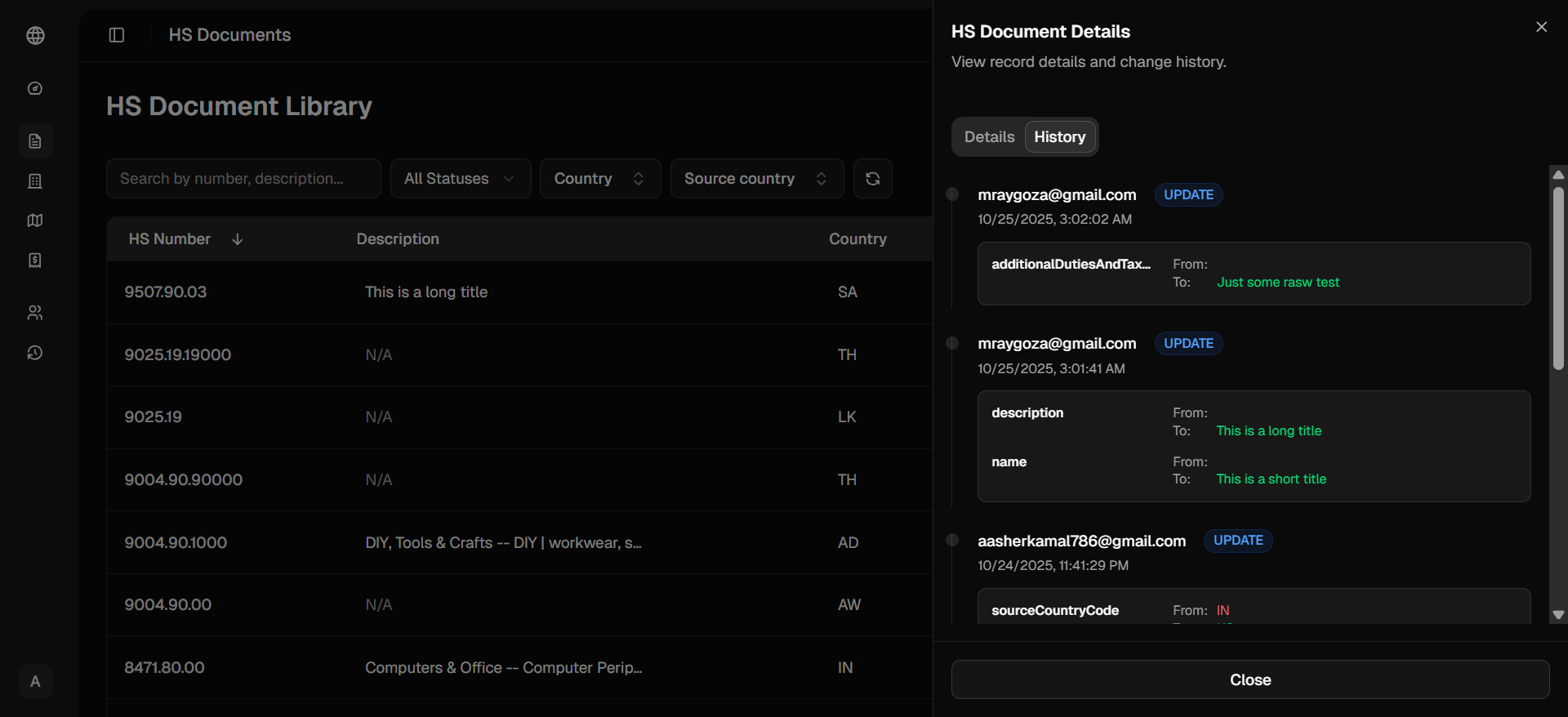
- Detail drawers that keep record context available while browsing.
- User administration and password set/reset flows.
- Consistent form validation across the interface and server.
- Field-level audit records for tracked changes.
- Read-only landed-cost history with detailed breakdowns.
- Dashboard summaries and activity charts.
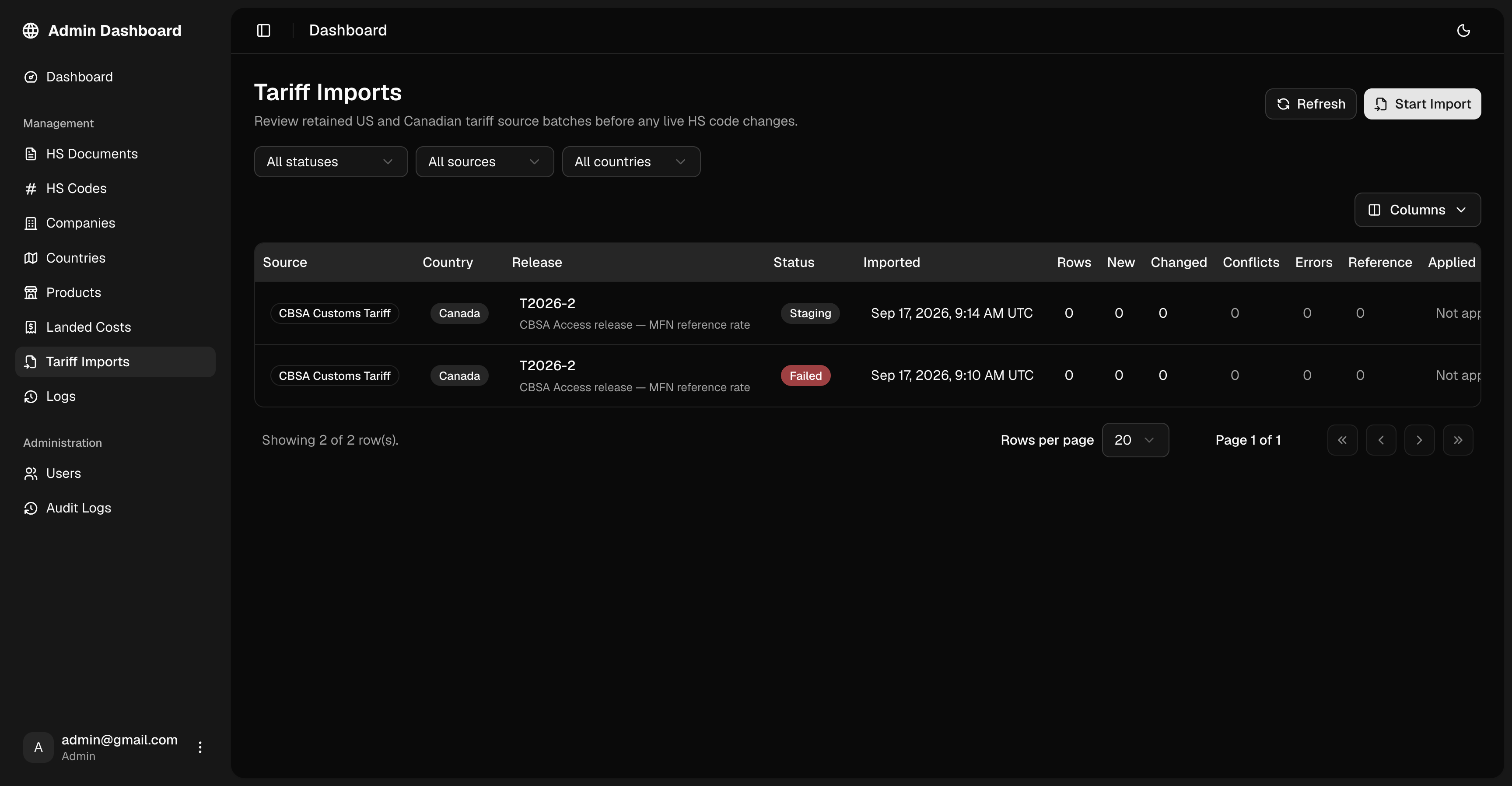
- Tariff imports with comparison, approval, and progress tracking.
Permission and Audit Model
The application separates administrative, editing, and read-only responsibilities. Permissions are enforced through server-side checks as well as the actions available in the interface.
Administrators can manage accounts, assign roles, and inspect the audit trail. Editors can maintain supported reference data, while viewers can browse records without changing them.
For tracked changes, the history records the affected fields, previous and updated values, person responsible, and time. Operators can inspect an individual record’s history, and administrators can search across changes.
Data Surfaces
HS documents
Validated forms and detail views support the management of product and classification reference records.
Each record includes a change-history view, making it easier to understand how its information has evolved.
HS codes
The tariff library provides searchable country-specific codes, descriptions, duty rates, and related reference information.
Filters help operators locate the right record by country, tariff number, and status.
Companies and countries
Consistent forms and searchable tables support trading-party profiles and country reference data.
Reference checks help protect records that are connected to other parts of the system.
Products
Product administration covers catalog details such as SKU, pricing, inventory, and categories within the same dashboard experience.
Landed-cost history
Historical calculations are presented through a searchable, filterable read-only interface.
Detail drawers keep cost breakdowns and related context visible without taking the operator away from the history list.
Users and activity
Administrators can manage accounts and roles, set temporary passwords, and require password changes.
Dashboard summaries, recent changes, and searchable system logs provide visibility into activity.
Tariff Review and Imports
The dashboard supports official tariff sources from the United States International Trade Commission and the Canada Border Services Agency.
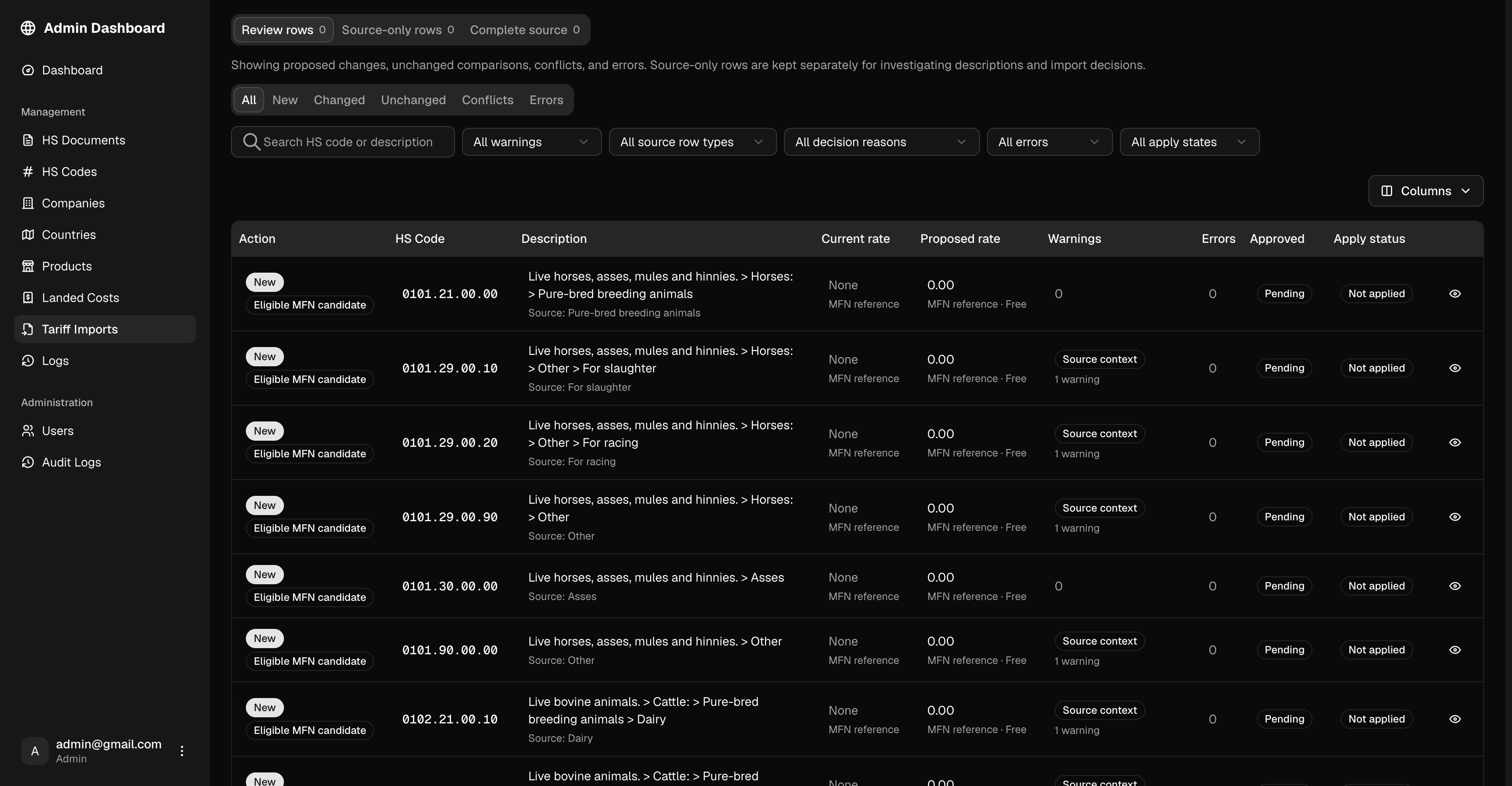
Imports create review batches with existing and proposed values, field differences, warnings, and source details. Operators can inspect entries individually or review a filtered group before approving changes.
An impact preview makes bulk approval easier to assess. Approved updates can then be applied with visible progress, while uncertain entries remain available for further review.
Architecture
- Application: Next.js, React, Tailwind CSS, and Shadcn/UI.
- Data access: Server routes with SWR for loading and refreshing records.
- Authentication: Auth.js sessions and role-based access checks.
- Database: MongoDB Atlas with Mongoose.
- Forms: React Hook Form and Zod for consistent validation.
- Visualization: Recharts for dashboard summaries and historical activity.
Reusable tables, forms, and detail views keep workflows consistent across the dashboard.
Decisions That Mattered
Keep historical records read-only
Historical calculations need to remain dependable references. The dashboard makes them easy to search and inspect while protecting them from routine editing.
Keep detail in context
Drawers let operators inspect records, cost breakdowns, and change history without losing their filters or position in a table.
Make permissions clear
Navigation, controls, and server checks follow the same role boundaries, helping users understand what they can access and change.
Protect connected data
Reference checks prevent certain records from being deleted while other records depend on them.
Review tariff updates before applying them
Separating import, review, approval, and application gives operators a clear decision point before reference data changes.
Delivered Scope
The dashboard brings trade-data management, product administration, user access, audit history, historical calculations, and tariff maintenance into one interface.
The project reinforced that internal software earns trust through clear records, understandable permissions, and visible change history.